

Introduction
Microsoft 365: The Enterprise Standard
Over 345 million users rely on Microsoft 365 for business email. Cloudiway helps organizations migrate seamlessly from any platform with zero downtime.
Migrating emails to Microsoft 365 (formerly Office 365) is a critical project that requires careful planning. Whether moving from Google Workspace, Exchange on-premises, or legacy systems, a successful migration ensures business continuity and preserves communication history.
This guide walks you through the complete email migration process, from planning to cutover, and explains how Cloudiway simplifies migrations with automated tools and expert support.
Supported Source Platforms
Microsoft 365 accepts email migrations from virtually any platform:
Gmail / Google Workspace
Preserves labels as folders, contacts, and calendars
Exchange On-Premises
Exchange 2010, 2013, 2016, 2019 mailbox migration
Exchange Online
Tenant-to-tenant Microsoft 365 migrations
IMAP Servers
Any IMAP server: Zimbra, Postfix, Dovecot, etc.
Lotus Notes / Domino
IBM Notes NSF file migration
Other Platforms
GroupWise, Kerio, MDaemon, and more
Migration Methods
Choose the migration method based on your source platform and requirements:
Cutover Migration
Small OrgsMigrate all mailboxes at once. Best for organizations under 150 mailboxes.
Staged Migration
Medium OrgsMigrate mailboxes in batches over time with directory synchronization.
Hybrid Migration
EnterpriseMaintain coexistence between on-premises Exchange and Microsoft 365.
Third-Party Migration (Cloudiway)
RecommendedMost flexible approach supporting any source. Zero-downtime with delta sync, automated mapping, and comprehensive reporting.
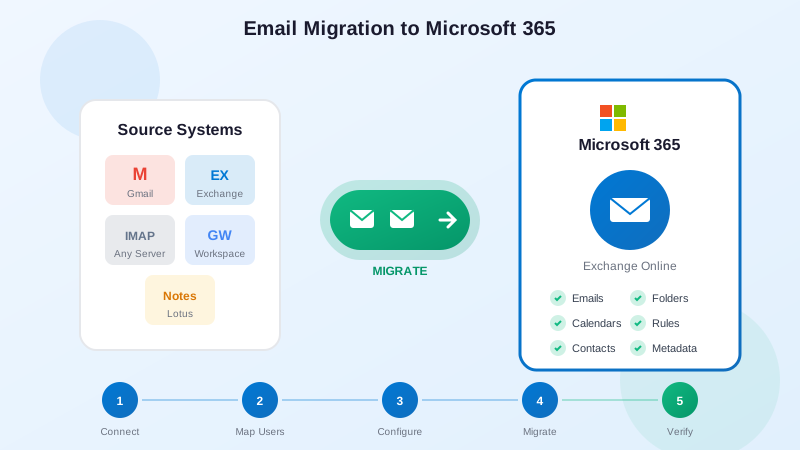
Step-by-Step Migration Process
Follow this proven process for successful email migration:
Prepare Microsoft 365
Configure tenant, domains, and create user accounts with licenses.
Connect Source System
Authorize Cloudiway to access source email via admin consent.
Map Users & Mailboxes
Match source users to Microsoft 365 accounts automatically or via CSV.
Configure & Test
Set migration options and run pilot migration with test mailboxes.
Run Full Migration
Start production migration while users continue working.
Delta Sync & Cutover
Run final sync, switch MX records, and verify migration.
What Gets Migrated
Cloudiway ensures complete data migration to Microsoft 365:
Best Practices
Follow these recommendations for a smooth migration:
Audit Mailboxes First
Identify large mailboxes and clean up unnecessary data before migration.
Communicate with Users
Notify users about timeline and provide Outlook training before cutover.
Run Pilot Migration
Test with representative mailboxes to validate settings and timing.
Schedule Strategically
Plan cutover during low-activity periods, avoid business-critical times.
Verify After Migration
Review reports and spot-check critical folders for data integrity.
The Cloudiway Solution
Cloudiway provides comprehensive email migration capabilities:
Zero Downtime Migration
Users continue working while data syncs in the background. Final cutover takes minutes.
Delta Synchronization
Incremental sync captures changes during migration, ensuring no data is lost.
20+ Source Platforms
Migrate from Gmail, Exchange, IMAP, Lotus Notes, and virtually any email system.
Expert Support
Dedicated migration specialists guide you through planning and execution.
Ready to Migrate Your Emails?
Get a free migration assessment. We'll analyze your source system and provide a detailed plan.
Frequently Asked Questions
How long does it take to migrate emails to Microsoft 365?
Migration duration depends on data volume and source platform. A typical 50-mailbox migration takes 2-5 days. Cloudiway processes approximately 10-15 GB per hour per migration slot, with parallel processing for faster results.
Will users lose access to email during migration?
No. Cloudiway performs live migrations with delta sync, meaning users can continue working in their source email system while migration runs. Final cutover typically requires only minutes of downtime.
Can I migrate emails from Gmail to Microsoft 365?
Yes. Cloudiway supports full Gmail and Google Workspace migration to Microsoft 365, including emails, labels (converted to folders), contacts, and calendars. The migration uses Google APIs for optimal performance.
What email data is migrated to Microsoft 365?
Cloudiway migrates emails with attachments, folder structure, read/unread status, flags, and metadata. Depending on source platform, contacts, calendars, and other data can also be migrated.
Do I need to create Microsoft 365 accounts before migration?
Yes. User accounts with appropriate licenses must exist in Microsoft 365 before migration. Cloudiway can help automate user provisioning and license assignment through its platform.
Can I migrate shared mailboxes and distribution lists?
Yes. Cloudiway supports migration of shared mailboxes, resource mailboxes (rooms/equipment), and distribution lists. These are recreated in Microsoft 365 with appropriate permissions.


