

We're excited to announce the release of our free Cross-Tenant Migration Orchestrator - a powerful new solution designed to streamline and automate your Microsoft 365 tenant-to-tenant migrations.
Migration between Microsoft 365 tenants has traditionally been one of the most challenging IT projects an organization can undertake. The complexity of coordinating multiple services, managing prerequisites, and ensuring data integrity has made these projects time-consuming and error-prone.
Today, we're changing that with our new Orchestrator - a tool that brings automation, simplicity, and reliability to cross-tenant migrations.
Why We Built It
Microsoft's native solution for migrating mailboxes and OneDrive between tenants is powerful but notoriously complex. It requires:
- PowerShell expertise and manual configuration
- No graphical interface - everything through command line
- Manual coordination of interdependent services
- Complex prerequisite setup and validation
- Risk of permission breaks during migration
These challenges often lead to extended project timelines, unexpected issues, and significant IT overhead. We built the Orchestrator to eliminate these pain points.
The average cross-tenant migration project takes 3-6 months when done manually. With the Orchestrator, you can reduce this timeline by up to 60%.
Key Features
The Cross-Tenant Migration Orchestrator includes a comprehensive set of features designed to simplify every aspect of your migration:
1. Automated Provisioning
The Orchestrator automates the provisioning process, greatly reducing the time and effort needed to prepare your environment. No more manual user creation or attribute mapping - the tool handles it automatically.

2. Prerequisite Validation
Before migration begins, the Orchestrator performs a thorough check of all prerequisites. This ensures your environment is ready and helps prevent migration failures due to missing configurations.
3. Intuitive User Interface
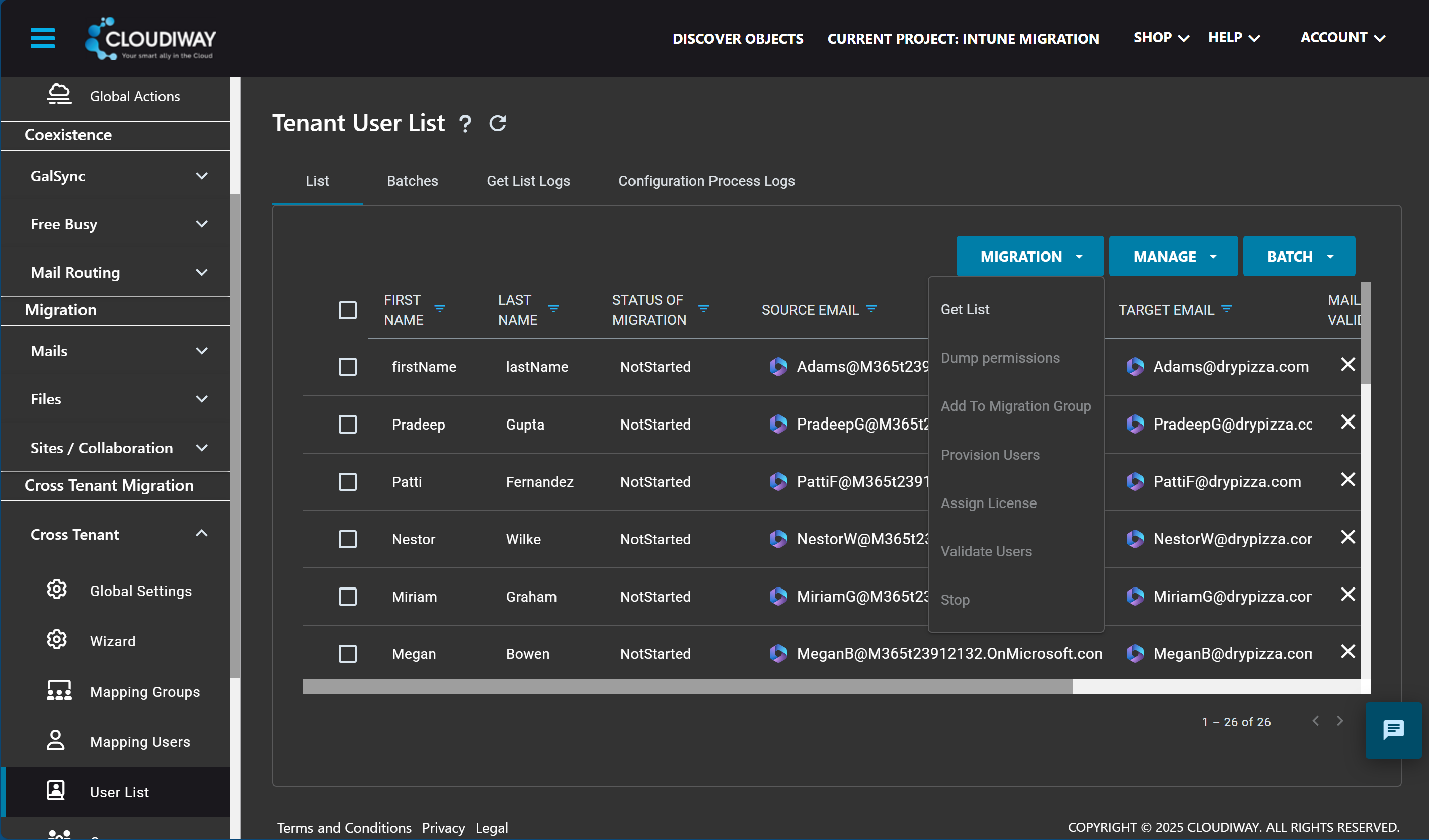
Unlike Microsoft's native solution, our Orchestrator provides a user-friendly graphical interface. No PowerShell required - making migration accessible to a wider range of IT administrators.
4. License Management
The solution facilitates license management by automatically assigning and transferring requisite licenses during the migration period, eliminating manual license juggling.
5. Interdependent Services Orchestration
Exchange, Teams, SharePoint, and OneDrive are tightly integrated services. The Orchestrator intelligently coordinates their migration, minimizing disruption and compatibility risks.
6. Permissions Preservation
Permissions are entirely preserved during migration. While Microsoft's native tool can break some permissions, Cloudiway automatically detects and fixes these issues.
The Orchestrator is completely free. You only pay for the actual migration licenses based on the data you migrate.
How It Works
The Orchestrator simplifies the migration process into a straightforward workflow:
Connect Tenants
Connect your source and target Microsoft 365 tenants through our secure interface.
Validate Prerequisites
The Orchestrator automatically checks and validates all migration prerequisites.
Configure Migration
Select users, configure settings, and schedule your migration batches.
Execute & Monitor
Launch the migration and monitor progress through the real-time dashboard.
Getting Started
Ready to simplify your cross-tenant migration? Here's how to get started:
- Sign up for a free Cloudiway account if you don't already have one
- Access the Orchestrator from your Cloudiway dashboard
- Follow the guided setup to connect your tenants
- Run a pilot migration with a small batch of users
- Scale up to your full migration once validated
Our documentation includes comprehensive guides and our support team is available to help you every step of the way.
Conclusion
The Cross-Tenant Migration Orchestrator represents a significant step forward in making Microsoft 365 migrations more accessible and reliable. By automating the complex tasks and providing an intuitive interface, we're enabling organizations to migrate with confidence.
Whether you're facing a merger, acquisition, divestiture, or tenant consolidation, the Orchestrator is designed to make your migration project successful.
Try the Orchestrator today and experience the difference that intelligent automation can make in your migration project.
Ready to Streamline Your Migration?
Get started with the free Cross-Tenant Migration Orchestrator today.