


What is an AI Readiness Assessment?
An AI readiness assessment is a read-only, automated analysis of your Microsoft 365 environment that evaluates access controls, permission sprawl, and governance gaps before deploying AI tools like Microsoft 365 Copilot. It delivers a CAF readiness score, prioritized risk findings, and a clear remediation roadmap — in minutes instead of weeks.
Microsoft 365 Copilot supercharges search, but the benefits extend beyond speed. Embedded deeply into your Microsoft 365 ecosystem and powered by a secure AI functionality, Copilot promises faster access to institutional knowledge and measurable productivity gains.
That said, Copilot excels at respecting permission levels. While this makes it secure in theory, it also makes it potentially dangerous in practice.
The AI-powered assistant doesn't simply help employees find things faster. It makes everything they already have access to instantly searchable, summarizable, and redistributable. That means anything your organization has unintentionally shared in the past could become discoverable overnight.
In other words, AI search turns old habits into new risks.
The uncomfortable truth is that most teams don't actually know what Copilot will surface on day one. The Copilot question is no longer "can we deploy?" It's "what risks will Copilot expose once we activate it?"
Our latest AI Readiness Assessment is designed to answer exactly this question before it's too late.
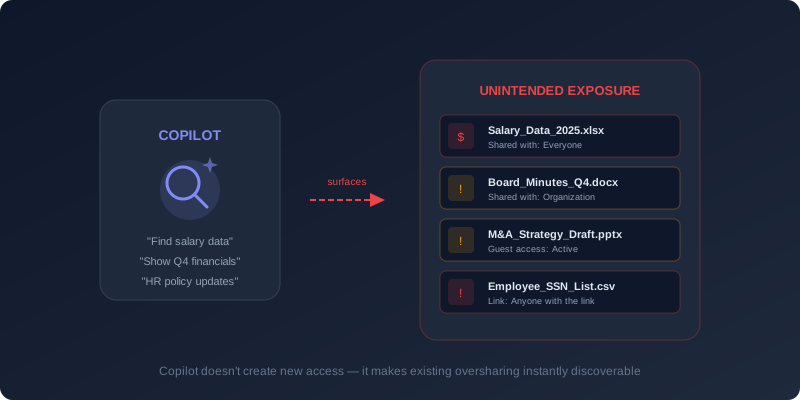
Why Traditional Audits Break Down in an AI-Indexed Environment
Traditional access reviews weren't designed for AI-powered environments. Given the scale of your operations, a typical review today can take weeks of coordinated IT effort. By the time it's complete, your teams have already created new links and added new users. Yesterday's findings are almost immediately rendered obsolete.
These risks aren't theoretical. They reflect the real cost of unmanaged access.
Exposure also doesn't announce itself. Breaches are rarely detected at the moment sensitive data is accessed. With AI-powered search, sensitive content can be surfaced and reused long before anyone realizes it was broadly discoverable. According to the IBM Cost of a Data Breach 2025 report, 97% of organizations that experienced an AI-related security incident lacked effective AI access controls.
For leadership, the implication is clear. Deploying Copilot isn't just a productivity initiative; it's a data governance decision as well.
AI Readiness as a Deployment Prerequisite
A manual permissions audit is one way to go.
Another, far more efficient and secure approach is to deploy the Cloudiway AI Readiness Assessment, which instantly evaluates access, governance, and security across your whole environment. What would have taken your IT team days or weeks to complete, you can now accomplish in minutes.
Rather than focusing on configurations in isolation, the assessment highlights common patterns that appear across organizations, including:
- Files shared more broadly than intended
- Sensitive data that remains unlabeled and unprotected
- Guest accounts that were never reviewed or removed
- Inconsistent MFA coverage for privileged users
- Governance policies that no longer reflect how teams collaborate
The output is a practical report and priority roadmap, so you know exactly what to fix first while keeping deployment on track.
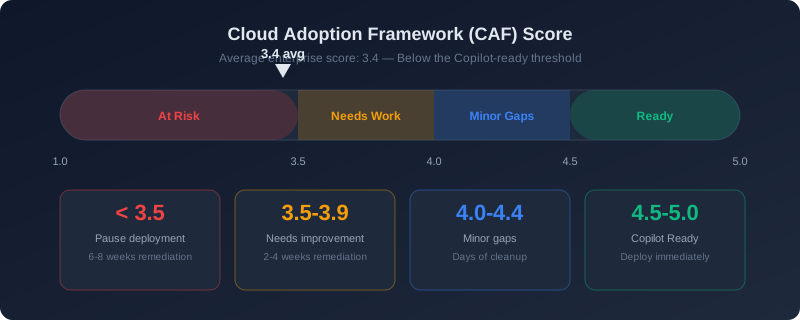
Putting Your Client's Readiness in Numbers
After the assessment, you'd receive a single Cloud Adoption Framework (CAF) Score between 1.0 and 5.0 that reflects whether foundational controls can safely support Copilot. In our research, companies scored an average of 3.4, which is below the Copilot-ready threshold. Most of the issues arose not from a lack of security checks, but because years of unchecked access decisions had outpaced visibility and control.
CAF gives leaders what they need most:
- A clear baseline for deployment decisions
- Prioritized remediation based on real risk
- Confidence to move forward without guesswork
| CAF Score | Interpretation | What This Means |
|---|---|---|
| < 3.5 | At Risk | Critical security and governance gaps exist that could lead to serious exposure. Copilot deployment should be paused until remediation is completed (typically 6–8 weeks). |
| 3.5 – 3.9 | Needs Improvement | Core controls are in place, but key vulnerabilities remain. A focused 2–4 week remediation effort is needed before safe rollout. |
| 4.0 – 4.4 | Minor Gaps | Nearly ready. Only low-risk issues remain, typically resolved within days through best-practice cleanup. |
| 4.5 – 5.0 | Copilot Ready | Strong security posture and mature governance. Copilot can be deployed immediately with confidence. |
Running read-only and analyzing metadata only, the assessment has zero impact on day-to-day work. It delivers a readiness score, key risk findings, and a clear remediation roadmap.
Turning Hidden Exposure into Prioritized Action
In most environments, risk isn't concentrated in a single place. Instead, it is distributed across collaboration tools, identities, and email workflows that have evolved over time.
The Cloudiway AI Readiness Assessment surfaces these risks in context and ranks them by impact, including:
- Overshared content: Files and sites with unrestricted or legacy access
- Unprotected sensitive data: Information lacking enforceable policy controls
- External access sprawl: Guest users without clear ownership or regular review
- Excessive privileged access: Elevated permissions that expand blast radius if compromised
- Uncontrolled data flows: Messaging and collaboration paths that move data beyond intent
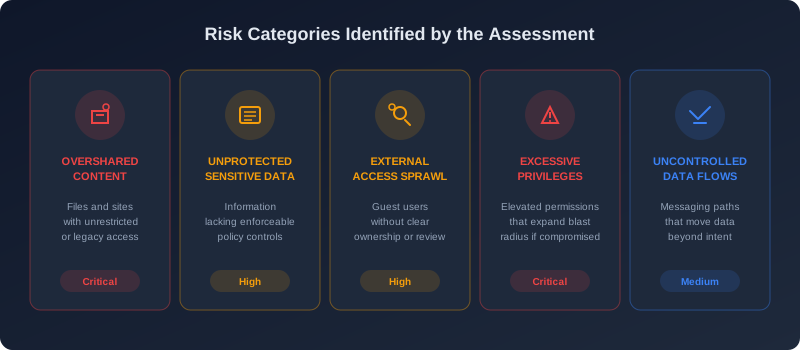
Each issue is evaluated based on business impact, likelihood, and regulatory relevance. This allows teams to focus on the few changes that materially reduce exposure, rather than chasing long lists of low-value findings.
By addressing the highest-risk conditions first, organizations create an environment where Copilot can be enabled deliberately. These controls stand up to audit, support daily operations, and reduce unintended access at AI speed.
All the Scale, None the Risk: Enabling Copilot for Partners
For partners, the challenge isn't demand. Customers already want Copilot. The challenge is delivering Copilot deployments consistently across environments that vary widely in maturity. A readiness-led approach gives MSPs and distributors a repeatable, defensible way to support Copilot adoption.
Each engagement follows the same progression:
- Establish visibility into access, sharing, and governance conditions
- Reduce excess access that no longer aligns with business intent
- Enable Copilot in an environment that is governed and defensible
The structure benefits both sides. Customers gain clarity on what must be resolved before deployment. Partners operate within a defined scope, supported by evidence rather than assumptions.
As AI removes friction between access and action, speed alone is no longer sufficient. Successful Copilot adoption requires strong visibility and governance. Cloudiway's repeatable AI readiness framework helps partners meet growing demand while ensuring deployments remain both fast and secure.
Help Your Customers Become Copilot Ready
Deliver fast, repeatable AI readiness assessments that reduce risk and accelerate deployment. Try Cloudiway's AI Readiness Assessment today! You can also explore the detailed assessment documentation or the product overview to learn more.
Get Your AI Readiness Assessment
Identify permission sprawl, fix governance gaps, and deploy Copilot with confidence. Start your free assessment today.

