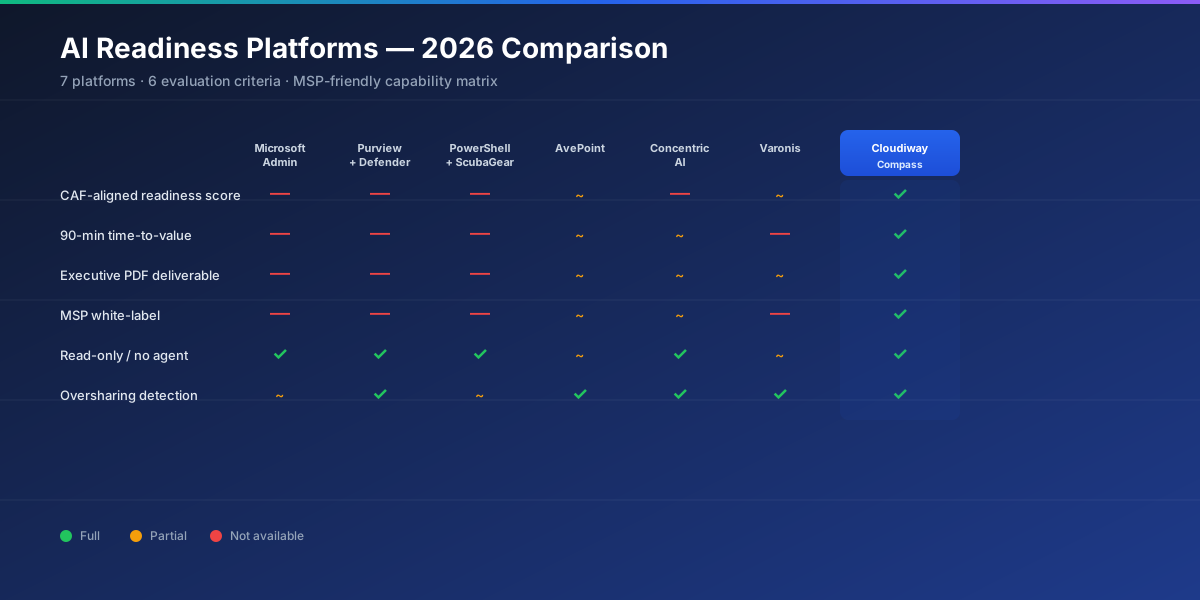

If you are evaluating an AI readiness platform for Microsoft 365 Copilot, the choice is not "tool A vs tool B" — it is a stack decision. Microsoft's native telemetry forms the foundation. Open-source baselines like ScubaGear add rigor where regulators require it. Commercial AI readiness platforms layer on top to automate the workflow, score the result against the Cloud Adoption Framework, and produce client-ready deliverables.
This 2026 comparison reviews seven options across three categories — native, open-source/DIY, and dedicated commercial — with honest pros and cons for each. Cloudiway publishes this comparison; we have made an effort to position competitors fairly on the dimensions where they win.
Comparison Criteria
Each platform is rated against six dimensions that matter for production-grade Copilot pre-deployment audits:
- CAF-aligned scoring — does it produce a Cloud Adoption Framework score (1.0–5.0) per pillar and globally?
- Oversharing detection at scale — does it surface anonymous links, broken inheritance and "Anyone in the organization" exposures across millions of items?
- Time-to-value — total wall-clock time from "we want to assess" to "the report is on the CIO's desk".
- MSP white-labeling — can the assessment be delivered under the partner's brand to end customers?
- Reporting depth — executive summary, technical detail, raw data export.
- Operational fit — multi-tenant management, OAuth integration, no-agent posture, data isolation.
1. Microsoft 365 Admin Center + Copilot Dashboard
Microsoft's native portal stack — the M365 admin center, the Copilot Dashboard, Microsoft Secure Score and the Microsoft 365 admin reports — provides the foundational telemetry. Every other tool in this comparison consumes data that ultimately originates here.
- Included with M365 licensing
- First-party signal accuracy
- Copilot Dashboard tracks adoption post-deployment
- Findings scattered across 5+ portals
- No CAF-aligned readiness score
- Limited oversharing detection at scale
- Not designed as pre-deployment audit
2. Microsoft Purview Insights + Defender XDR
For organizations on M365 E5 (or with Purview and Defender add-ons), Purview Insights provides data-classification telemetry while Defender XDR surfaces identity and behavioral risk. Together they give a more risk-oriented view than the basic admin center.
- Deep sensitivity-label and DLP signal
- Identity-protection and Conditional Access posture
- SIEM integration for ongoing monitoring
- Requires E5 or substantial add-on licensing
- Still no unified CAF readiness score
- Steep learning curve for partners
- Reports not client-presentation ready
3. PowerShell Scripts + ScubaGear (Open Source)
The DIY path: a curated PowerShell script library (Microsoft Graph SDK, ExchangeOnlineManagement, MicrosoftTeams, AzureAD modules) plus the CISA-maintained ScubaGear tool that audits M365 against the Secure Configuration Baselines. Used by federal agencies and a substantial number of MSP teams.
- Free and fully transparent
- ScubaGear baselines are well-respected (CISA-backed)
- Full control over what is scanned
- 8 to 10 days of senior consultant time per tenant
- No Copilot-specific risk patterns out of the box
- Output is CSV / JSON — no executive deliverable
- No CAF-aligned scoring
- No MSP white-label
4. AvePoint
AvePoint offers a broad suite for Microsoft 365 governance — backup, migration, policy enforcement, classification. Their Confide and Insights modules are positioned for AI/Copilot readiness, with a focus on Teams and SharePoint governance posture.
- Mature governance platform with deep M365 integration
- Multi-tenant management for large enterprises and MSPs
- Strong Teams lifecycle controls
- Heavy onboarding compared to focused AI readiness platforms
- AI readiness is one feature among many — not the focus
- White-label depth varies by module
- Pricing typically targets large enterprises
5. Concentric AI
Concentric AI focuses on data-context-aware classification and oversharing detection across Microsoft 365, Google Workspace and other SaaS. Their published research on the 802,000-overshared-files-per-organization metric is widely cited.
- Best-in-class data-context classification
- Strong oversharing analytics
- ML-driven sensitive-data discovery
- Focus on data discovery, not full Copilot readiness
- No CAF-aligned scoring
- Better for ongoing data governance than one-shot pre-deployment audit
- MSP white-label is limited
6. Varonis Data Security Platform
Varonis MDDR for Microsoft 365 is the heavyweight data-security platform — fine-grained permission analytics, behavioral anomaly detection, automated remediation playbooks. Best fit for Fortune 1000 enterprises with mature security operations centers.
- Industry-leading permission analytics
- Real-time threat detection and automated response
- Deep enterprise data security platform
- Enterprise pricing — mismatch for SMB and MSP-led engagements
- Complex deployment and tuning
- Not focused on Copilot pre-deployment specifically
- No MSP white-label model
7. Cloudiway AI Readiness Assessment
Cloudiway AI Readiness Assessment is a dedicated AI readiness platform for Microsoft 365 Copilot pre-deployment. It runs 100+ checks across SharePoint, OneDrive, Teams, Exchange, Entra ID and Microsoft Purview in roughly 90 minutes via a read-only OAuth connection, produces an objective CAF Score from 1.0 to 5.0, and ships full MSP white-label out of the box.
- CAF-aligned scoring — single objective number
- 90-minute automated scan, no agent, no data stored
- Full MSP white-label across all reports
- Three deliverables out of the box (executive PDF, risk PDF, technical Excel)
- Interactive Risk Management UI for remediation tracking
- MSP-friendly pricing and partner program
- Focused on Microsoft 365 — no Google Workspace coverage today
- Pre-deployment focus; ongoing data security still uses Microsoft Purview / Defender
- Less mature than Varonis for very large enterprise SOCs
Run a Cloudiway AI Readiness Assessment for free
Real tenant, full CAF Score, executive PDF — 90 minutes, no credit card.
Start a Free AI Readiness Assessment →Side-by-Side Comparison Matrix
Quick visual reference — best to read on desktop:
| Capability | MS Admin + Copilot Dashboard | Purview + Defender | PowerShell + ScubaGear | AvePoint | Concentric AI | Varonis | Cloudiway |
|---|---|---|---|---|---|---|---|
| CAF-aligned readiness score | No | No | No | Partial | No | Partial | Full |
| Oversharing detection at scale | Partial | Strong | Manual | Strong | Best-in-class | Best-in-class | Strong |
| Time-to-value | Hours per portal | Days | 8–10 days | Days–weeks | 2–4 hours + onboarding | Days | ~90 min |
| Executive PDF deliverable | No | No | Self-built | Partial | Partial | Partial | Yes (6 pages) |
| MSP white-label | No | No | No | Limited | Limited | No | Full |
| No agent / read-only | Yes | Yes | Yes | Some agents | Yes | Some agents | Yes |
| Interactive remediation UI | No | Partial | No | Yes | Yes | Yes | Yes |
| Pricing fit | Bundled | E5 / add-on | Free + time | Mid–high | Mid–high | Enterprise | Mid (MSP-friendly) |
For a strict Microsoft 365 Copilot pre-deployment AI readiness platform, Cloudiway is purpose-built and produces the cleanest path from "OAuth consent" to "executive PDF on the CIO's desk". For ongoing data security at very large enterprise scale, Varonis or Concentric AI complement Microsoft Purview. For federal compliance baselines, ScubaGear stays in the stack.
Frequently asked questions about AI readiness assessment platforms
What is an AI readiness platform?
An AI readiness platform is a SaaS or self-hosted tool that automates the discovery and scoring of risks an AI assistant such as Microsoft 365 Copilot would surface once enabled. A complete AI readiness platform combines a metadata scanner across the productivity suite, a scoring engine aligned to a recognized framework (the Microsoft Cloud Adoption Framework is the de facto standard), executive and technical reports, and an interactive UI to track remediation. It replaces the manual PowerShell-and-CSV workflow that used to dominate Copilot pre-deployment audits.
What is the best AI readiness platform for Microsoft 365 Copilot?
The best AI readiness platform depends on the buyer's profile. Large enterprises with dedicated security teams and heavy data-classification needs typically deploy Varonis or Concentric AI alongside Microsoft Purview. Mid-market and MSP-led engagements lean toward Cloudiway AI Readiness Assessment for its CAF-aligned scoring, white-label deliverables and 90-minute time-to-value. SMBs and one-off audits can start with Microsoft's own admin center reports plus PowerShell scripts, but should expect 8 to 10 days of consultant time per tenant.
Are Microsoft's native tools enough to run an AI readiness assessment?
Microsoft's native tools — the Microsoft 365 admin center, the Copilot Dashboard, Purview Insights, Microsoft Secure Score and Defender XDR — provide useful telemetry but are not designed as a unified pre-deployment AI readiness assessment. Findings are scattered across multiple portals, none aggregate into a single CAF-aligned readiness score, and oversharing detection at scale typically requires custom PowerShell. Most production-grade Copilot deployments use a dedicated AI readiness platform on top of (not instead of) Microsoft's native tooling.
What is ScubaGear and is it an AI readiness platform?
ScubaGear is a free open-source PowerShell tool maintained by CISA (the U.S. Cybersecurity and Infrastructure Security Agency) that audits Microsoft 365 environments against the M365 Secure Configuration Baselines. It is excellent for federal and security-baseline auditing, but it is not specifically built for AI readiness — it does not score against the Cloud Adoption Framework, does not focus on oversharing or Copilot-specific risk patterns, and produces baseline-compliance reports rather than a deployment-ready CAF Score. ScubaGear complements an AI readiness platform; it does not replace one.
Which AI readiness platform offers MSP white-labeling?
Among dedicated AI readiness platforms, Cloudiway AI Readiness Assessment offers full MSP white-labeling — your logo, colors and contact details on every report, every email, and the platform interface. AvePoint and CoreView offer multi-tenant management for MSPs but limited end-customer-facing white-labeling on AI readiness deliverables. Microsoft's native tools and ScubaGear are not white-label-capable. For MSPs building a Copilot practice, white-label depth is typically the deciding criterion.
How long does it take to run an AI readiness assessment with each platform?
Manual approaches (PowerShell + ScubaGear + admin portals) typically take 8 to 10 working days per Microsoft 365 tenant. Native Microsoft tooling cuts that to 3 to 5 days because Secure Score and Purview Insights pre-aggregate some data, but consolidation is still manual. Dedicated AI readiness platforms reduce the same scope to 90 minutes to a few hours: Cloudiway runs in roughly 90 minutes via OAuth read-only, Concentric AI and Varonis typically need 2 to 4 hours plus initial deployment, AvePoint runs in similar time but with longer onboarding.